

The key to winning is not merely having the desire to do so, it is the preparation to win that propels you to great heights. In that vein, to succeed in today’s competitive business world, your business must stand out to effectively reach your target audience.
In this endeavor, the best preparation you can do is to develop a strategic sales tool – which comes in the shape of the digital business catalog. This powerful tool can serve as a cornerstone of your marketing strategy. A well-crafted digital catalog showcases your product offerings, communicates your brand identity, and drives sales and conversions.
Navigating the challenges of digital marketing and sales is not easy, but with the right tools you will be able to design a digital catalog that stays true to your company identity and exceeds customer expectations. Every decision that you make within the catalog is critical to its success. From incorporating engaging design elements to leveraging data-driven solutions, you can overcome these challenges and develop a digital catalog that not only attracts but also retains customers.
This blog provides actionable strategies and best practices for creating a winning digital catalog that aligns with your unique niche, engages your audience, and boosts your bottom line.
Significance of Creating An Effective Catalog That Aligns With Your Business Niche
No matter what your specific business is, in the modern age of digital consumerism, creating a catalog that aligns with your business niche is critical for building brand identity, meeting customer expectations, and driving sales.
There is an expectation from shoppers that they will receive seamless access to consistent product information updates. This has become a bit of an online shopping requisite. A digital catalog that is put together well effectively showcases your products, company values, and market positioning. Shoppers no longer want faceless corporations, they want tailored, personalized shopping experiences.
But, many businesses struggle when it comes to catalog design. A common challenge they face is creating a sense of balance between visuals and functionality for clarity of purpose. If you load up your catalog with too much information, images, and other tchotchkes of the design process, you risk overwhelming your customers. On the other hand, too minimal of a design will not provide the necessary information needed to help customers make informed decisions.
Yet another challenge is making sure that the tone, style, and messaging of the digital catalog align themselves with the identity of your brand.
To overcome these challenges, businesses should shift their focus to creating catalogs that are visually appealing, user-friendly, and completely on par with their niche. A well-crafted catalog will become more than merely a list of products – it will transform itself into a dynamic sales tool that drives engagement and sales.
Key Strategies for Creating an Effective and Engaging Digital Catalog
As you set out to design your digital catalog, it is important to first define your niche. You will set up this understanding by thoroughly understanding your business and target audience. This will help you build a high-performing digital catalog.
Defining your niche shapes every decision you make. A well-defined niche enables you to tailor your catalog’s product selection, design aesthetics, layout, messaging, and features to appeal to your particular audience segment.
Simply transforming your catalog from print to digital isn’t enough. To truly capture attention and drive results, your catalog must be strategically crafted to be engaging, interactive, and aligned with your audience’s needs. Let’s examine some key strategies for creating a digital catalog that converts.
1. Align Your Digital Catalog with Your Business Direction
Once you have settled on your niche, focus on your business goals. Do you want to drive volume, promote premium product offerings, or launch a new product line? Identifying these objectives will help you guide your product hierarchy and how items are showcased throughout your catalog.
Just as crucial is gaining a deeper understanding of the wants and needs of your audience. For example, B2B buyers usually prioritize technical details, quick navigation, and optimized mobile access. Knowing your audience within your niche business will help you to design an immersive and engaging catalog experience. Ultimately, it’s not just about the products you sell – it’s how you showcase them.
2. Choose the Right Features for Your Digital Catalog
Design the catalog with multimedia elements such as embedded video clips, clickable links, page flip animations, zoom functionality, keyword search, and more. These interactive elements enhance the user experience and add depth to your digital catalog, which increases engagement.
Keep the catalog layout simple and clean, but use these features to help convey information efficiently while not overwhelming the reader. Use the interactive elements to create a visually appealing catalog without crowding the pages.
3. Design an Engaging and On-Brand Digital Catalog
- Layout: Pay close attention to the layout. Decide on the juxtaposition of colors, white space, words, and images to play into the overall look and feel of the content. It should be stimulating, but not uncomfortable to look at. A good rule is to keep the design simple.
- Contrast and Balance: Use contrasting colors, (light vs. dark, complementary colors), varying sizes, shapes, and textures to create balance and symmetry throughout the digital catalog. You are telling a story with every page you have laid out. You want your content to extend the storytelling and create an immersive experience for your audience.
- Proportions: A great way to tie together the principles of design with the layout is to decide on the proportions of images, videos, product information, and clickable links that will lie on each page. When you set up calls-to-action, for example, highlight the button on a catalog page with a contrasting color and shape from the surrounding content.
These best practices pave the way for you to create an easy-to-navigate catalog that captures attention and encourages action.
4. Highlight Your Unique Selling Points
A unique selling point (USP) is how you present your products or services in a way that highlights your business’s unique advantages. This answers the question: “Why should a customer choose you instead of someone else?”
For example, your USP might be “Only eco-certified building materials with zero carbon offset.” or “Interactive, mobile-ready product catalogs updated in real time.” Within your digital catalog, create compelling product descriptions that clearly communicate your product’s value within a crowded marketplace.
5. Incorporate Social Proof and Customer Engagement
Social proof such as reviews, testimonials, case studies, and chatting on social media are the most effective ways to increase engagement with your customers. This shows that you are not a faceless company, but one with a heart, made up of real people.
Showcase your business through BTS (behind the scenes) videos, take time to interact with customers on social media platforms, and highlight customer reviews. Leveraging social proof will help to build trust and encourage purchasing decisions.
6. Make Your Digital Catalog Accessible and Shareable
Digital catalogs provide the advantage of accessibility across various devices and platforms, so that your materials are optimized for viewing on desktops, tablets, and mobile devices. Opt for a responsive design that adapts to different screen sizes and devices. This allows users with disabilities to access the content seamlessly on various platforms. Responsive design is key to providing a seamless experience regardless of the user’s preferred device.
Make it easy to share your digital catalog via social media or by emailing a link. Integrate email or social media links, or call-to-action buttons, that make it easy for customers to share and spread the word.
Make it simple to get your catalog into buyers’ hands. The more accessible your catalog, the wider your reach.
7. Regularly Update Your Digital Catalog for Continued Relevance
Keep your digital catalog up-to-date with the latest accessibility standards and best practices for continued relevance. As technology and guidelines evolve, continue to improve and enhance the accessibility features of your catalog. This is an essential practice to follow to reflect your evolving business and product offerings.
Outdated catalogs lead to lost sales and confused customers. Automate updates through integrations with your:
- ERP or inventory systems
- PIM (Product Information Management) platform
- Pricing and promotions database
This ensures your catalog always reflects real-time stock, pricing, and product details—building trust and saving your team time.
Grabber Case Study
Grabber, a company that specializes in construction products, created an interactive catalog with DCatalog to enhance their clients’ shopping experiences.
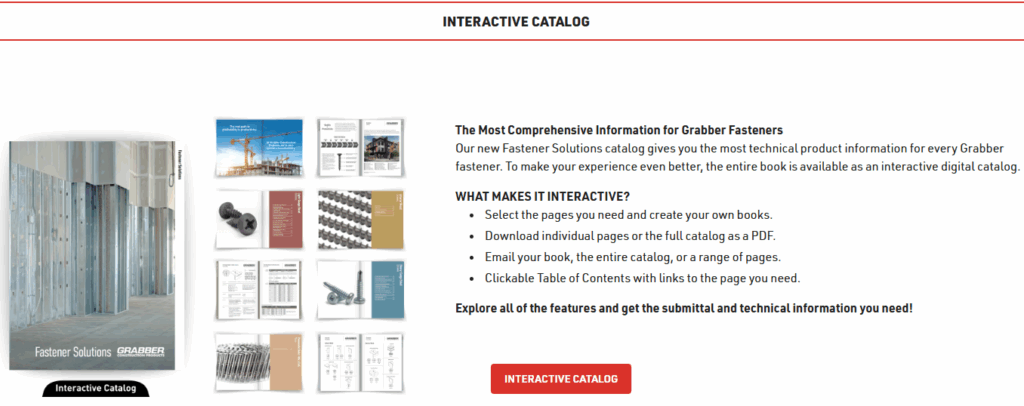
Grabber launched their interactive catalog with DCatalog to offer a source of comprehensive information for their clients. Through the digital catalog, they are able to provide technical product information for every fastener they make. Their clients are able to use a key feature – MyCatalog technology – that enables them to segment their own mini-catalogs to drill down into the particulars of what they need.
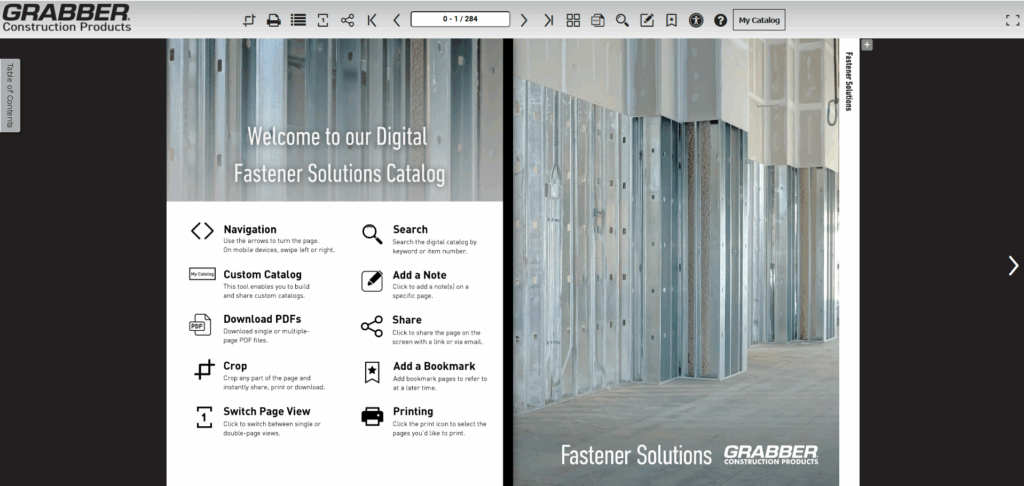
They designed the catalog by using several principles of design to present crucial information. They incorporated an intro page to guide customers through the catalog and show them how to seamlessly navigate the pages, make a custom catalog, share it by email or social media, or even print out the pages they need. Finally, Grabber added a pull-out table of contents section so that all clients can find the information they need at their fingertips.
Conclusion: A Winning Catalog to Drive Conversions
Creating a winning business catalog for your niche is more than just creating a digital version of a static catalog. It becomes a living, evolving sales engine. To truly capture attention and drive results, your catalog must be strategically crafted to be engaging, interactive, and aligned with your audience’s needs.
By implementing the strategies discussed here, you can transform your catalog into an engaging, data-driven experience that helps guide customers, shorten sales cycles, and increase conversions.
Whether you’re just getting started or optimizing an existing edition, reach out to one of our Publishing Executives today, or sign up for a free trial to experience our platform for yourself.