Tired of outdated PDFs, spreadsheets and endless manual edits? DCatalog turns your product data into live, interactive line, stock, sell, and sales sheet templates. Always accurate, always on-brand, and ready to share in seconds.

DCatalog gives you full control over the look and feel of your sheets. Upload your data once, then choose from grid, chart, or list layouts, pre-designed or fully custom templates, to match your brand. Generate polished, professional PDFs or interactive sheets that update in real time.
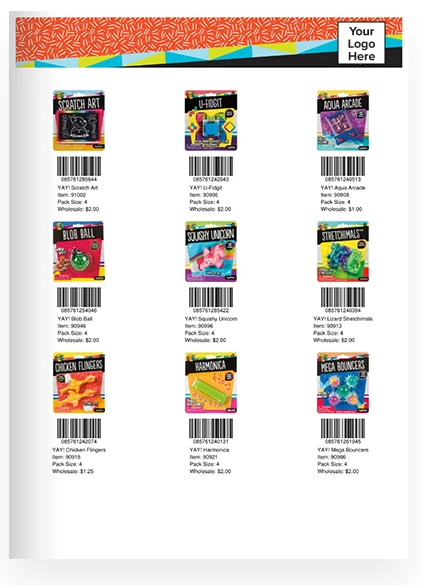
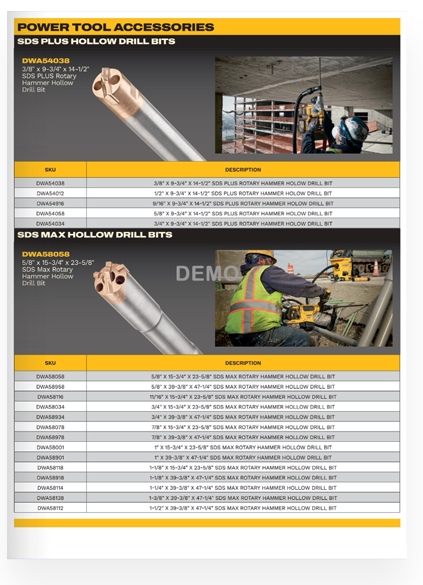
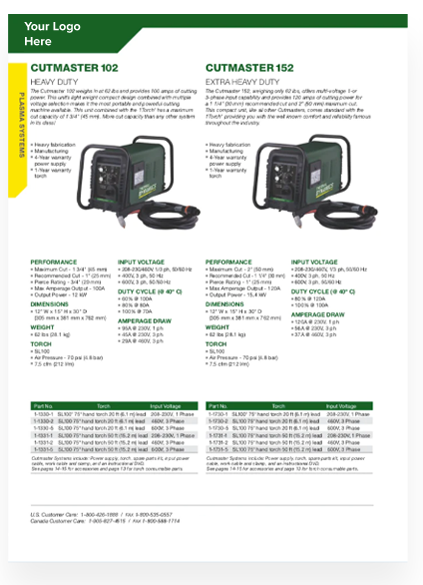
Create professional, on-brand line sheets with just a few clicks. Upload your product catalog, apply your logos, fonts, and colors, and instantly generate polished line sheets that are tailored to your buyers and wholesale partners.


Keep your inventory data accurate and up to date. DCatalog connects directly to your database, spreadsheet, or PIM system so your stock sheets automatically reflect the latest pricing, SKUs, and product availability. No more manual updates or outdated PDFs.
Turn static sell sheets into engaging, sales-ready tools. Add interactive features, including:


Equip your sales reps with mobile-friendly, easy-to-share sales sheets. Whether embedded on your website, sent by email, or shared on social media, DCatalog ensures your teams and clients always have access to the most current sales materials.
Protect your sensitive product and pricing information with multiple layers of security. Set client-specific passwords, enable single sign-on, or embed your sheets behind HTTPS login pages to control who can view and share your line, stock, sell, and sales sheets.

DCatalog helps you eliminate outdated PDFs and manual spreadsheet edits. Create interactive, always-accurate sheets your team can share instantly.

Upload a spreadsheet, CSV, or connect your database. Your product info is pulled in instantly, so you can build line sheets, stock sheets, sell sheets, and sales sheets without wasting time on manual formatting.
Pick from grid, chart, or list layouts and add your branding. Create sales sheets that highlight features, line sheets that showcase collections, or stock sheets that stay in sync with real-time inventory.

Export a print-ready PDF or publish an interactive digital version. Share your sheets by email, embed them on your site, or send them directly to clients and distributors. Everything looks great on desktop, tablet, and mobile.
Stop wasting time on manual updates. DCatalog creates dynamic line, stock, sell, and sales sheet templates that save hours, reduce errors, and help your team sell more effectively.

Always Accurate Sheets
No more manual entry errors. Automated updates keep your line and stock sheets synced with the latest pricing, SKUs, and inventory details.

Custom Pricing for Every Audience
Quickly generate tailored sales sheets for specific clients, regions, or purchase tiers, without creating separate versions by hand.

Faster Time-to-Market
Push new products, promotions, and price changes into your sell sheets and stock sheets instantly, so reps and buyers always see the latest.

Built-In Integrations
Connect directly to your PIM, DAM, ERP, or eCommerce platform. Real-time sync means your sheets update automatically as your data changes.

Better Buyer Experience
Interactive digital sheets are searchable, multimedia-ready, and easy to share — giving customers a smoother path to purchase.

Scales With Your Business
As you grow, automated sheets make it simple to manage and distribute accurate, up-to-date content across all your markets and channels.
Hear directly from our clients…no filter needed: “Any time we need to update product information in our sheets, we simply refresh the source data and regenerate the content on demand.”
Get a Demo

Yes. DCatalog connects directly to your database, spreadsheet, or PIM system so your line sheet templates, stock sheets, and sell sheets update in real time. No more sending outdated PDFs to your customers.
Every line, stock, sell, and sales sheet template in DCatalog can be fully branded with your colors, fonts, and logos. You can also choose from grid, chart, or list layouts to fit your product catalog.
Absolutely. Manufacturers, distributors, and dealers use DCatalog to generate tailored sell sheet templates with custom pricing, co-branding, or regional SKUs without rebuilding everything from scratch.
DCatalog offers multiple layers of security, including password protection, SSO, and HTTPS embedding. This keeps your line sheets and sales sheets private, so only authorized clients can view them.
Not at all. Once your product data is connected, reps can generate branded, professional line sheets or sell sheets with just a few clicks. No design or IT support needed.